> For the complete documentation index, see [llms.txt](https://guide.plumber.gov.sg/llms.txt). Markdown versions of documentation pages are available by appending `.md` to page URLs; this page is available as [Markdown](https://guide.plumber.gov.sg/user-guides/actions/ownself-gather.md).
# Ownself Gather
Ownself Gather (OG) is a lightweight customer relationship management (CRM) tool designed for seamless collaboration and productivity. It helps you digitalise your operations with minimal development effort.
More information about OG can be found [here](https://ownself.gather.gov.sg/).
{% hint style="info" %}
When creating your API key on OG to use with Plumber, ensure that you have granted the **Admin** role.
**How to create an API key on OG?**
1. Go to `Settings`
2. Navigate to `API Keys`
3. Create a new API Key, and name it accordingly.
4. Choose the appropriate permissions.
5. Save your API key safely.
{% endhint %}
## Adding a new Ownself Gather connection
| Field | Description | Required? |
| ------- | ------------------------------------------- | --------- |
| Label | Enter the desired name for your connection. | ✔️ |
| API key | Enter the API key that you created on OG. | ✔️ |
## Update case
Use this action to update an existing case in OG. For example, you can update a case status (e.g. from *Pending* to *Approved*) or modify existing field values.
This is useful when automating case progression or syncing status updates.
| Field | Description | Required? |
| ----------- | -------------------------------------------------------------------------------------------------------------------------------------------------------------------------------------------------------------------------------------------------------------------------------------------------------------------------------------------------------------------------------------------------------------------------------------------------------------------------------------------------------------------------------------------------------------------------------------------------------------------------------- | --------- |
| Case UUID | Select the Case UUID for the case you want to update. | ✔️ |
| Case status | Select the status to update the case to. | |
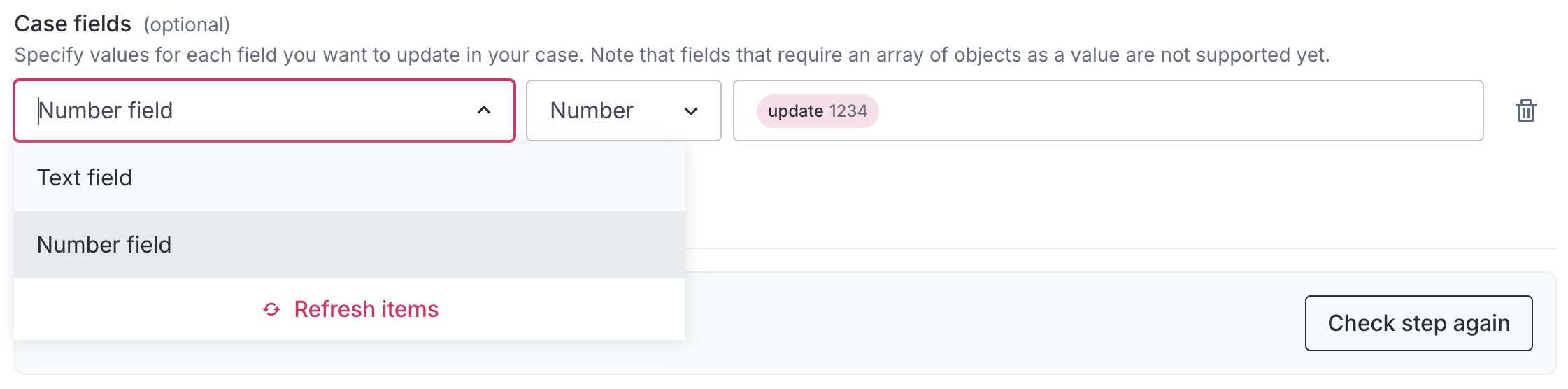
| Case fields |
Select the fields and enter the values you want to update.
Case fields also supports mapping FormSG answers into Dropdown, Checkbox, and Radio Button field types on OG, not just text-based fields. Checkbox fields accept a FormSG checkbox variable, and Autofill will set the matching field type automatically.
| |
## Tag/untag case
Use this action to add or remove tags from an existing case in OG. Tags help you group and filter cases easily on OG, for example by marking certain cases as *High Priority* or *Follow-up Required*.
| Field | Description | Required? |
| ------------ | ------------------------------------------------------------- | --------- |
| Case UUID | Select the Case UUID of the case you want to tag or untag. | ✔️ |
| Tag or untag | Select whether you want to add or remove a tag from the case. | ✔️ |
| Tag value | Enter the tag value. | ✔️ |
## Create case
Use this action to create a new case in OG. You can select the case type, specify its initial status, and fill in the necessary fields that define the case.
This action is typically used when you want to automatically create new case entries in response to a new form submission or other trigger.
| Field | Description | Required? |
| ----------- | ----------------------------------------------------------------------------------------------------------------------------------------------------------------------------------------------------------------------------------------------------------------------------------------------------------------------------------------- | --------- |
| Case type | Select the type of case you want to create. | ✔️ |
| Case status | Select the status to assign to the new case. | |
| Case fields |
Select the fields and enter the values to include in the new case.
Case fields also supports mapping FormSG answers into Dropdown, Checkbox, and Radio Button field types on OG, not just text-based fields. Checkbox fields accept a FormSG checkbox variable, and Autofill will set the matching field type automatically
| ✔️ |
## Get case details
Use this action to retrieve the details of an existing case in OG. It returns the case's fields and values, which you can use as variables in later steps.
This is useful when you need to reference or act on existing case data — for example, looking up a case before updating it.
| Field | Description | Required? |
| --------- | ------------------------------------------------------ | --------- |
| Case UUID | Select the Case UUID of the case you want to retrieve. | ✔️ |
**Output variables include:** Case type, Case UUID, Name, Email, and any other fields defined in your case type.
## Common errors
Invalid or missing field values
This error occurs when the field values do not match the expected type. For example, this may happen if you selected a number type but entered a string, or if a required value is missing.
**Date fields**\
Dates must be converted to the "YYYY-MM-DD" format when updating date fields in OG. Use the **Formatter** action to convert the dates, then use the formatted value in your OG step. Please enter a valid case uuid
This error occurs when an invalid Case UUID is provided. Ensure that you have selected the correct Case UUID for your case.
Error fetching case fields
If you encounter the error “You have not been granted access to this feature or page” when attempting to refresh the Case fields, ensure that the API key you’re using with Plumber has been granted the **Admin** role.
Case UUID isn't matching after publishing
If a case UUID isn't being found or matched after your pipe has been published, try: unpublish the pipe, create a mock case directly in OG, then republish. This forces the UUID to re-sync on the backend, and shouldn't need repeating unless the same symptom recurs.
401 error on cases created via email
If OG's own case activity log shows a webhook call to Plumber failing with a 401 (you won't see this in Plumber's own Executions page), check whether the case was created via email rather than directly inside OG. Plumber doesn't yet support triggering the instant workflow for email-created cases, that's the specific gap causing the 401, regardless of your pipe's publish status.
## FAQ
Is there a guide for Ownself Gather?
Yes. You can find the guide [here](https://go.gov.sg/og-user-guide).
Is Ownself Gather free to use?
Yes. Ownself Gather is free to use. You can find more details in the [guide](https://dcubeux.gitbook.io/ownself-gather#is-it-free-to-use).
Who can use Ownself Gather?
Ownself Gather is available to all government officers.
| | How to sign in? |
| ------------------------------------------------------------------------------------------------------------------------- | ---------------------------------------------------------------------------------------------------------------------------- |
| gov.sg email holders | Sign in directly using your gov.sg email address. |
| Non-gov.sg users (TIVO, Agencies without gov.sg emails) | Sign up for an account via Singpass, then request a gov.sg officer to add you to their app. |
How do I log in to Ownself Gather?
Follow the instructions in the [guide](https://dcubeux.gitbook.io/ownself-gather/basic-guide/signup-login).
I cannot find the Ownself Gather option on Plumber
Submit a request using this [form](https://go.gov.sg/plumber-support) and the team will get back to you.
How to update my Ownself Gather API key?
If your API key is expiring, you don't need to delete and re-add your connection.
1. Go to **My Apps** and open **Ownself Gather**.
2. On the **Connections** tab, find the connection you want to update.
3. Click the **···** menu on that connection and select **Edit connection**.
4. Confirm the dialog, then enter the new **API key** (you can also update the **Label**).
5. Click **Update connection**.
Plumber checks the new API key against OG immediately. If it's invalid, you'll see an error and your existing connection keeps working until you enter a valid key. Once the update succeeds, all pipes using this connection automatically use the new key. No further changes needed.